Pixel Art - Color by Number
- 4.6
- Rating
- 100.00M
- Installs
- Free
- Price
 Analysis by App-foxy
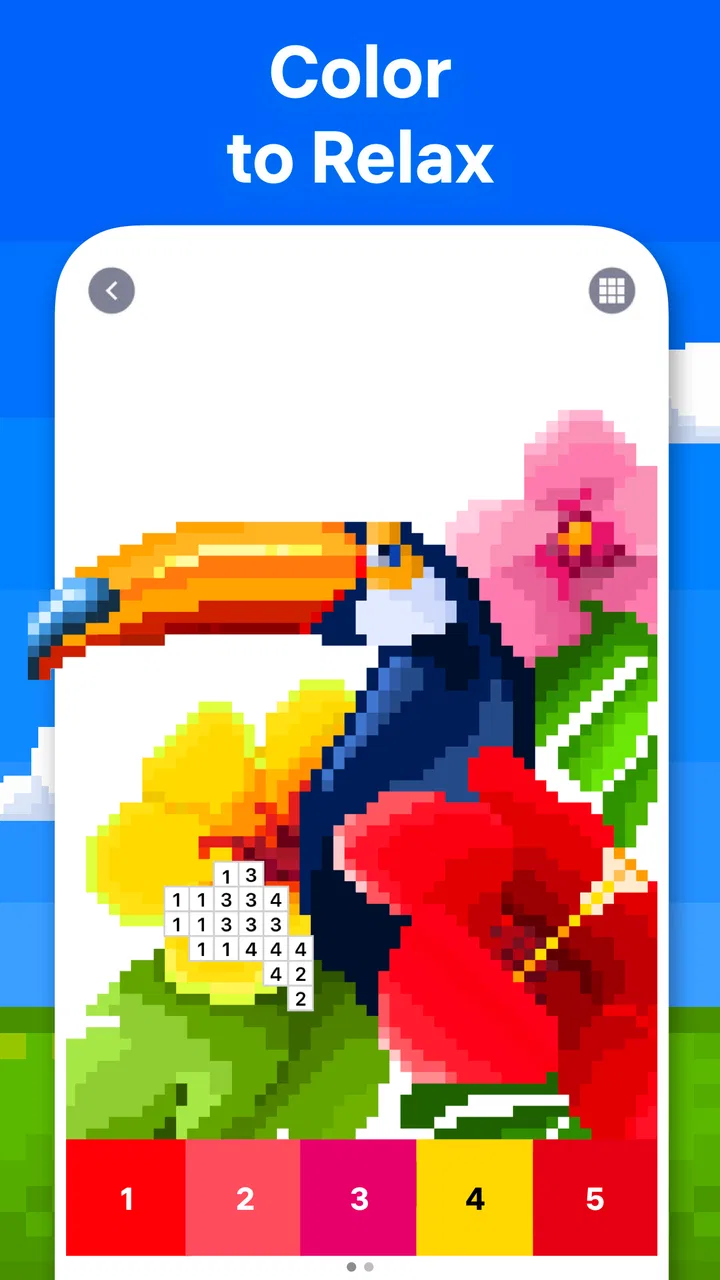
I opened Pixel Art - Color by Number expecting a simple way to fill a few minutes, and that is exactly where it makes the strongest impression. This is a free puzzle game from Easybrain built around coloring numbered pixel pictures. You choose an image, match each number with its color, and gradually turn a mostly blank grid into a finished illustration. The action is uncomplicated, but the steady visual progress gives it a surprisingly pleasant pull.
What makes the game worth discussing is not the basic idea alone. Plenty of coloring apps offer numbered pictures, and many puzzle games promise relaxation. Here, the appeal comes from the complete rhythm: I make a small choice, see an immediate response, complete a section, enjoy the finished image, and then feel ready to start another one. That loop is gentle rather than demanding, which makes it suitable for short breaks, quiet evenings, or anyone who wants a puzzle without a complicated rule set.
How the coloring loop feels in real use
I find the coloring loop most enjoyable when I give each session a small, practical goal instead of trying to finish an entire picture at once. Choosing a single color or a clearly recognizable area makes progress easier to notice, while a quick zoom adjustment can prevent tiny cells from turning into guesswork. That balance between a little focus and a natural stopping point is what shapes how the game fits into everyday play.
You May Also Like

 Pandora - Music & Podcasts
Pandora’s Music Is Easy to Start, but Harder to Recover
Pandora’s strength is its low-effort path from a seed to a station. Its weak spot is how much confidence it asks you to place in connection, setup, and quiet recovery.

 AccuWeather: Weather Radar
AccuWeather Review: A Quick, Clear Forecast for Everyday Decisions
For everyday plans, the best forecast is the one you can understand quickly. AccuWeather makes rain timing, radar, and local conditions easy to act on, with a few trade-offs.

 Hill Climb Racing
Why Hill Climb Racing Still Turns Crashes Into One More Run
A tiny car, a bumpy hill and one more upgrade: Hill Climb Racing keeps resurfacing because its simple chaos makes every near-miss feel personal.

 AliExpress - Shopping App
AliExpress Makes Global Shopping Feel Personal, but Shoppers Bear the Risk
AliExpress turns a global marketplace into a pocket-sized discovery engine. Its reach is useful, its shopping loop compelling, and its trade-offs easy to miss.

 Lords Mobile: Kingdom Wars
Lords Mobile Is a Kingdom-Building Routine, Not a Quick Match
A case-by-case verdict on the building, battles, device demands, and social commitments that make Lords Mobile rewarding for some players and exhausting for others.

 PDF Scanner app - TapScanner
TapScanner Makes Paperwork Easier to Capture, Check, and Share
TapScanner makes scanning with a phone feel less like a rescue operation and more like a dependable step in getting work done. Its capture tools are useful, though not flawless.
More From Our News Desk
View All News


The first action is easy to understand
The game does not ask me to learn a complicated control scheme. I pick a pixel-art picture and work through the numbered areas. The useful decision is whether to follow the visible numbers in order or search for every area belonging to the current color. I usually prefer the second approach because it gives each tap a clear purpose and lets me see a color spread across the image.
That small choice is important. If I simply tap whatever looks convenient, the experience feels like routine completion. If I select one color and look for its matching cells, the picture begins to reveal its structure. Dark outlines may appear first, while brighter areas later give the image its character. The game remains accessible, but there is still a modest sense of visual planning.
The pixel format also makes mistakes less intimidating than they would be in a detailed drawing app. Every area is sharply separated, and the numbered grid gives me a direct instruction. I am not trying to produce a beautiful drawing with my own hand; I am completing a design that already has a clear destination. That distinction matters for people who want a relaxing activity rather than a creative tool.
On a phone, small cells can become the main source of friction when a picture is dense. I sometimes need to zoom in or make a more careful tap, especially when several tiny areas sit close together. That is not a serious problem, but it changes the mood slightly. The larger, simpler pictures feel best when I want effortless relaxation; intricate ones are better when I am willing to concentrate.
Immediate feedback keeps the next tap meaningful
The strongest part of the experience is the feedback rhythm. A correct color fills its matching pixel, and the image becomes a little more recognizable. The response is immediate enough that I never wonder whether an action registered. Each completed patch gives me a small visual reward, even before the whole picture is finished.
I find this especially effective during short sessions. If I have only a few minutes, I can still complete a handful of areas and leave the image visibly different. That is more satisfying than a puzzle where progress is hidden until the final answer. The screen itself keeps a record of what I have done, so returning to an unfinished picture feels natural rather than discouraging.
The feedback also creates a useful balance between attention and relaxation. I need to look closely enough to find the right cells, but I do not need to calculate, remember a long sequence, or protect a fragile streak. There is no pressure to be clever in the traditional puzzle-game sense. The challenge is mainly visual patience and accuracy.
For a realistic everyday example, I can imagine using it after commuting home when I want something more active than watching a video but less demanding than a strategy game. I might finish one color group while waiting for dinner, put the phone down, and return later without having lost the thread. The unfinished image acts as a quiet invitation rather than a task that demands immediate attention.
The reward is completion, not competition
The finished picture is the main reward. Watching a scattered collection of numbered pixels become a complete piece of art gives the session a clear ending. I do not need a leaderboard or a competitive score to understand what I achieved. The satisfaction comes from the transformation on screen and from knowing that every small section has been handled.
This is where the game differs from conventional logic puzzles. In Sudoku, a completed grid rewards deduction. In a match-three game, the reward often comes from chains and rapid reactions. Here, the reward is closer to tidying a visual space. The picture starts incomplete, my actions remove that incompleteness, and the final image gives me a clean stopping point.
That stopping point is useful, but it also exposes a limitation. If I want deep problem-solving, this will probably feel too gentle. The numbered structure removes most of the uncertainty, so the game does not offer the same mental workout as a crossword, nonogram, or Sudoku puzzle. It is better understood as a calming coloring activity with a puzzle-like interface than as a demanding brain-training game.
The free price makes it easy to try without committing money at the beginning. The game is rated for Everyone, which fits its straightforward controls and non-violent subject matter. In-app purchases range from $5.49 to $46.99 per item, so I would pay attention to the purchase flow if I were handing the device to a child. The core appeal is easy to sample, but optional spending can become relevant for someone who plays frequently.
Why another session begins
After finishing a picture, the game naturally resets the question from “Can I complete this?” to “Which image should I color next?” That is a simple but effective transition. The completed artwork provides closure, while the collection of available designs supplies a reason to continue. I do not have to invent a new goal; the next canvas is already waiting.
This reset is most successful when I treat each picture as a self-contained break. I can begin with a small intention, such as completing one color family or working until the image is recognizable, and stop without feeling that I abandoned a larger campaign. That makes the game friendlier to irregular players than experiences built around daily obligations or long uninterrupted levels.
At the same time, the loop can become repetitive. The basic action remains tapping numbered cells, and the reward remains visual completion. If I play for a long stretch, the lack of changing mechanics may become noticeable. The game is strongest when I let it occupy a modest part of my day instead of expecting it to provide hours of escalating variety.
Useful habits for getting more from each picture
My first practical tip is to choose the image according to my energy level, not just its appearance. A simple picture is better when I am tired and want a smooth sequence of easy wins. A more detailed pixel design works when I want to focus and do not mind spending longer locating small cells. Choosing the right level of visual density prevents the relaxing loop from turning into needless tapping frustration.
My second tip is to work by color when the interface makes that comfortable. Completing one color across the picture often reveals boundaries and makes later colors easier to spot. It also creates visible milestones inside a single image. When I am distracted, I instead follow the easiest obvious areas first; that keeps the session moving without forcing me to scan the entire canvas.
A third useful habit is to stop at a natural visual milestone. I might finish a recognizable object, complete a prominent outline, or clear one group of related areas. This gives the session a deliberate ending even when the picture is not complete. It is a better approach than continuing automatically just because the next cell is available, particularly when I am using the game as a short mental break.
Zooming is another small but important part of the workflow for detailed pictures. I use it when a cluster of tiny numbered cells is difficult to distinguish, then return to the wider view to check how the image is developing. Staying zoomed in for too long can make the task feel like searching through a spreadsheet, while switching views helps preserve the sense that I am coloring a picture rather than merely processing symbols.
Where it fits among other puzzle and coloring apps
Compared with freehand coloring apps, this game removes the pressure of choosing exact shades or staying inside irregular outlines. That makes it more predictable and more relaxing for me, but also less expressive. If I want to create something personal, experiment with blending, or draw from an empty canvas, a freehand alternative is a better match.
Compared with nonograms and Sudoku, the mental demand is lighter. Those games ask me to infer hidden information and accept that a wrong deduction can disrupt the whole solution. Pixel Art - Color by Number gives me clearer guidance and more immediate visual feedback. I would choose it when I want calm concentration, not when I am specifically looking for a difficult logic challenge.
Compared with match-three games, it has a slower pace and a quieter reward structure. There are no rapid chains to chase in the basic coloring action, so it suits players who dislike timers, reflex pressure, or crowded screens. The trade-off is that it may feel underpowered to someone who needs constant novelty and escalating excitement.
The game also works differently from a traditional coloring book. A physical book offers a tactile experience and complete freedom over color choices, while this app gives me a guided digital path. The advantage is convenience and immediate correction-free progress; the disadvantage is that the result is determined by the design rather than by my own artistic decisions.
What the audience and technical details suggest
Easybrain has positioned this as a broadly accessible puzzle game, and its audience size reflects that reach: it has passed 100 million installs and holds a 4.5 average from around 2.5 million ratings. Those figures do not replace personal experience, but they help explain why the format feels polished around a very familiar mobile habit: open, complete a small visual task, and close the app.
The game first appeared on October 16, 2017, and the current version is 10.6.1. It supports devices running Android 7.0 or later. That makes the compatibility requirement worth checking before installation, especially if the phone is older. On a supported device, the important practical question is less about learning the controls and more about whether the screen is comfortable for detailed pixel work.
Because it is free, I can test the basic loop without treating the download as a major decision. I would still approach optional purchases carefully. A player who only wants occasional relaxation may never need to spend anything, while someone who wants to keep coloring regularly should consider how quickly paid items could affect the overall value. The game’s best quality is its low barrier to entry, so spending should remain a deliberate choice rather than part of an automatic routine.
Who should play it, and who should skip it
I recommend it to people who enjoy calm, structured activities and like seeing progress accumulate one small step at a time. It is a good fit for a short break, a quiet bedtime routine, or a moment when I want to occupy my hands without committing to a demanding game. It can also suit players who enjoy pixel art but do not want to design their own images.
I would be more cautious about recommending it to anyone seeking substantial strategic depth. If the pleasure of a puzzle comes from discovering a solution through deduction, the numbered coloring format may feel too guided. I would also skip it if I wanted complete artistic freedom, a highly competitive system, or a fast-changing arcade experience.
Children can understand the basic activity easily because the instructions are visual and direct, and the Everyone rating supports its broad accessibility. Still, I would supervise purchases on a shared device. The age suitability of the content does not automatically make every spending decision suitable for every family, so device-level purchase controls remain sensible.
My verdict on the action-feedback-reward-reset loop
Pixel Art - Color by Number succeeds because it respects the small scale of mobile play. The first action is obvious, the feedback is immediate, the reward is visible, and the completed picture gives me a clean reset into another session. Nothing in that loop is revolutionary, but the pieces fit together well enough to make repeated short visits feel worthwhile.
Its limitation is equally clear: the core activity does not change much. The game cannot replace a serious logic puzzle, a creative drawing app, or a competitive arcade title. I also need to be mindful of detailed images and optional purchases, since both can add friction to an experience that is otherwise intentionally simple.
My honest recommendation is to try it when I want a guided coloring break rather than a test of intelligence or reflexes. The free entry, Everyone rating, and familiar numbered format make it approachable, while the large player base suggests that this particular kind of quiet progress has lasting appeal. If the pleasure of finishing a picture is enough to make you want to begin one more, this is a very easy game to keep nearby.
FAQs for Pixel Art - Color by Number
01What is Pixel Art - Color by Number?
Pixel Art - Color by Number is a mobile application that allows users to create stunning pixel art by filling in numbered boxes with corresponding colors. It offers a relaxing and engaging experience, perfect for users who enjoy art and creativity. The app is available for both Android and iOS devices.
02Is Pixel Art - Color by Number free to use?
Yes, Pixel Art - Color by Number is free to download and use. However, it does contain optional in-app purchases that can enhance the user experience. These purchases may include additional color palettes, exclusive artwork, and an ad-free experience. Users can still enjoy the app fully without making any purchases.
03What age group is Pixel Art - Color by Number suitable for?
Pixel Art - Color by Number is suitable for all ages, making it a great choice for children and adults alike. The app provides an easy and accessible way to engage with art, helping to develop creativity and attention to detail. Parents can feel confident knowing that the app offers family-friendly content.
04Can I save and share my artwork in Pixel Art - Color by Number?
Yes, users can save their completed artwork directly to their devices. Additionally, the app allows for easy sharing on social media platforms, making it simple to showcase your creations to friends and family. This feature enhances the overall experience by encouraging user interaction and feedback.
05Does Pixel Art - Color by Number require an internet connection?
Pixel Art - Color by Number can be used offline, allowing you to enjoy your creative sessions without an internet connection. However, some features, such as downloading new artwork and accessing in-app purchases, require an internet connection. Users can enjoy most of the app's features while offline.
Pros
- Simple and intuitive interface.
- Extensive color palette options.
- Regular updates with new images.
- Offline mode available.
- Suitable for all ages.
Cons
- Ads can be intrusive at times.
- Limited free content without subscription.
- Some colors are too similar.
- No custom image import feature.
- Occasional lag on older devices.

Pixel Art - Color by Number
Gallery